
Getting a new gas connection in Pakistan can be a long process. After submitting your application, the most common question is: “When will I get my meter?” or how to Check Sui Gas Application Status. Fortunately, you don’t have to visit the gas office repeatedly to find out. You can check your Sui Gas application status online using your CNIC or Application Reference Number.
In this guide, we will explain the step-by-step process for both SNGPL (Northern Pakistan) and SSGC (Southern Pakistan).
Two Main Gas Companies
Before you check your status, you need to know which company provides gas in your region:
- SNGPL (Sui Northern Gas Pipelines Limited): Serves Punjab, Khyber Pakhtunkhwa (KPK), and Islamabad.
- SSGC (Sui Southern Gas Company): Serves Sindh and Balochistan.
How to Check SNGPL Application Status (Punjab & KPK)
If you live in Lahore, Islamabad, Multan, Peshawar, or any city in the north, you belong to SNGPL.
Method 1: Check Online via Website
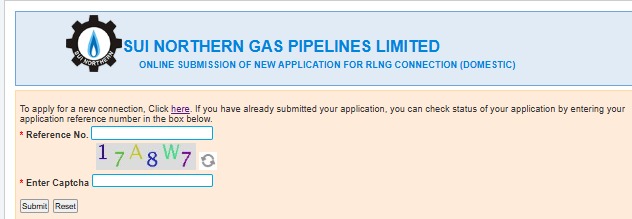
The most efficient way to track your application is through the official SNGPL web portal.
- Step 1: Visit the official SNGPL website (www.sngpl.com.pk).
- Step 2: Look for the “Customer Services” tab or the “New Connection” section.
- Step 3: Click on “Check Application Status.”
- Step 4: You will be asked to enter either your Application ID or your CNIC Number (the 13-digit number without dashes).
- Step 5: Click “Submit.” The screen will show whether your application is in progress, verified, or if there is an objection.
Method 2: SNGPL Mobile App
SNGPL has a dedicated mobile app called “SNGPL IR” available on the Google Play Store. You can log in, enter your details, and track your request directly from your phone.
Method 3: Helpline
If the website is down, you can call the SNGPL helpline at 1199. Provide your CNIC to the representative, and they will tell you the current stage of your application.
How to Check SSGC Application Status (Sindh & Balochistan)
For residents of Karachi, Hyderabad, Quetta, and other southern areas, the process is slightly different.
Step-by-Step Online Process
- Step 1: Go to the SSGC official website (www.ssgc.com.pk).
- Step 2: Navigate to the “Customer Service” menu and select “New Connection Status.”
- Step 3: Enter your Registration Number or CNIC Number.
- Step 4: Click “Search.”
The system will display the current status of your file. If your application has been approved, it might show “Demand Notice Issued.”
What Do the Status Terms Mean?
When you check your status, you might see different terms. Here is what they mean in simple words:
- Application Received: Your form has reached the office but hasn’t been processed yet.
- In-Progress/Survey Pending: A team will visit your house soon to check if gas pipes can be safely installed.
- Demand Notice Issued: This is the best news! It means your application is approved. You now need to pay the required fee in the bank.
- Pending for Connection: You have paid the fee, and you are now in the queue for meter installation.
- Objection: There is a problem with your documents (e.g., missing ID card copy or incorrect address). You must visit the regional office to fix this.
Read More: https://dlimsportal.com/8171-check-online-cnic-check-eligibility-criteria/
Common Reasons for Delay
Many people complain that their application has been “Pending” for years. Here is why delays happen:
- Gas Shortage: Pakistan is facing a natural gas crisis, so the government often limits the number of new meters installed per year.
- Seniority List: Gas connections are given on a “first-come, first-served” basis. If you applied in 2024, there might still be thousands of people from 2022 ahead of you.
- Incomplete Documentation: If your map or property documents are not clear, the file stays on hold.
- Security Clearance: Some areas require extra security checks before gas lines can be laid.
Tips for a Faster Connection
While the process is slow, you can ensure there are no unnecessary hurdles:
- Pay the Demand Notice Immediately: As soon as you get the demand notice, pay it. Your “Seniority” for the meter starts from the date of payment.
- Keep Your Documents Ready: Always have copies of your CNIC, property papers (Registry/Allotment letter), and a neighbor’s gas bill ready.
- Follow Up: Check your status online at least once a month. If it says “Objection,” go to the office immediately instead of waiting for a letter in the mail.
Checking your Sui Gas application status by CNIC is a simple process that saves you time and money. Whether you are under SNGPL or SSGC, the online portals are designed to keep the process transparent. Remember, patience is key, but staying informed through the online tracking system ensures that your file doesn’t get lost in the paperwork.
Tip: If you are moving to a new house that already has a meter, don’t apply for a “New Connection.” Instead, apply for a “Change of Name” to save time!