Introduction: What is Renewal and Why is it Necessary?
A Learner License is your official Practice Permit. In Punjab, this permit is valid for a maximum of 6 months (180 days). This time is given to you so you can practice driving and prepare for your final driving test.
If those 6 months pass and you haven’t taken the final test, or if you failed the test and your permit has expired, your license becomes invalid. You cannot legally practice driving, or take the final test, until you renew it.
Renewal is simply the process of asking the government system (DLIMS) to grant you another 6 months of validity. It’s a very fast and easy administrative task.
The best part? Unlike the initial application, when you renew an expired permit, you do not have to wait the mandatory 42 days again. You can renew today and book your final test tomorrow
Choosing Your Learner License Renewal Method
You have two main ways to renew your Learner License. The Online Method is the fastest and most popular.
A. Method 1: The Fast Online Renewal (Recommended)
This method uses the official government system: the Driving License Issuance Management System (DLIMS) or the Punjab Police App. It saves time and travel.
B. Method 2: The In-Person Renewal
If you have trouble using the internet or need assistance, you can visit a physical center like a Police Khidmat Markaz (PKM). They will help you complete the exact same online steps on their computers.
The Step-by-Step Online Renewal Process
This process is generally completed in less than 10 minutes.
Step 1: Get Ready and Log In
| Requirement | Details |
| Your CNIC | Have your Original CNIC ready. |
| Internet Access | Go to the DLIMS website (dlims.punjab.gov.pk) or open the Punjab Police Pakistan App. |
| Log In | Use your CNIC number and password to log in. If you never used the online system before, you will need to Sign Up (create a new account) first. |
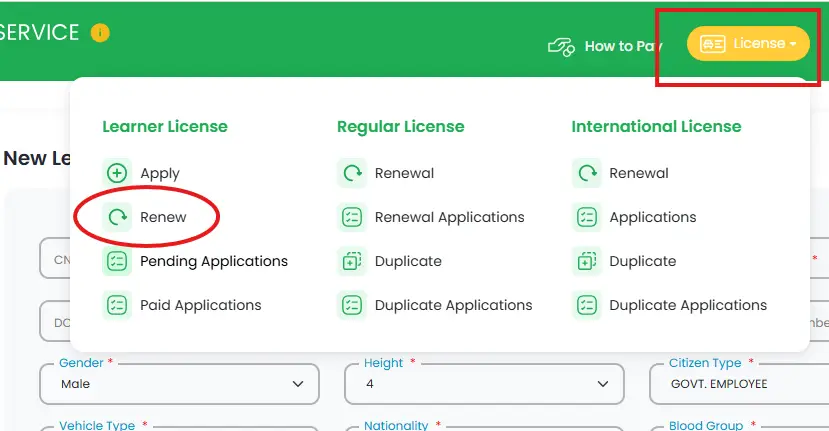
Step 2: Find the Renewal Option
Once you are logged into your profile:
- Navigate: Look for the section titled “Licenses“ or “Driving License.”
- Select: Click or tap on the option that clearly says “Learner License Renewal” or “Renew Learner Permit.”
Step 3: Verify Your Information
The system knows you are renewing, so it already has most of your old data.
- Check Details: The screen will show your name, CNIC, and the details of your expired permit. Check all information to ensure it is correct.
- Upload Documents (If asked): The system might prompt you to re-upload two documents for freshness:
- A clear image of your CNIC (front and back).
- A recent Passport-Sized Photo (a photo with a white or light background is best).
Step 4: Generate the Payment Code (PSID)
This is the most important step for payment:
- Fee Calculation: The system will automatically calculate the fee required for renewal. This fee is usually very small (it is not the same cost as the final license fee).
- Generate PSID: Click the button to “Generate PSID.” The PSID (Public Service Identifier) is a special 17-digit code that tells the bank exactly what you are paying for.
Step 5: Make the Payment
You must use this PSID code to pay the renewal fee. You have several convenient options:
- Mobile Banking: Use your mobile app (like your bank’s app, Easypaisa, JazzCash, etc.). Look for the “Government Payments” or “1-Link Bill Payment” section and enter the PSID code.
- ATM: Visit any ATM and select the “Bill Payments” or “1-Link” option, then enter the PSID.
- Online Banking: Use your bank’s website portal.
Important: The payment must be completed before the system can renew your permit.
Step 6: Print Your New License
This is where the magic happens!
- Check Status: After paying, go back to your DLIMS account. The system should update your payment status to “Paid” almost immediately.
- Download: Your new Learner Permit, which has been renewed for another 6 months, will now be available for download.
- Print: Print the renewed permit and keep it with you while practicing.
In-Person Renewal: Using the Police Khidmat Markaz (PKM)
If you cannot manage the online process, the PKM is your next best option.
- Documents: Take your Original CNIC and your Expired Learner Permit. Also, take a recent passport-sized photograph.
- Visit PKM: Go to the nearest Police Khidmat Markaz during working hours.
- Counter Assistance: Go to the designated counter (usually for Driving Licenses). The staff will use their computer system to log into the DLIMS portal for you.
- On-Site Payment: The staff will generate the PSID code (Step 4). You may be able to pay the fee right there using a debit/credit card, cash (if they have a counter), or they will tell you to quickly pay via your mobile phone before they print the permit.
- Get Printout: The staff will print the renewed Learner Permit for you immediately after payment is confirmed.
Frequently Asked Questions
| Question | Simple Answer |
| How long is the renewed license valid? | It is valid for another 6 months (180 days) from the date of renewal. |
| Do I have to wait 42 days again? | NO! This is the biggest advantage of renewal. Since you waited the 42 days initially, you are immediately eligible to book your final driving test once the renewal is complete. |
| What if I am 55 years old? | If you are 50 years or older, you must get a Medical Certificate (Form B) from a registered doctor, confirming you are fit to drive. You may need to upload this document during renewal. |
| What is the fee? | The fee is very low, usually under PKR 500 for a single category renewal. The exact amount will be shown when the PSID is generated in Step 4. |
Renewing your expired Learner’s License in Punjab is not a difficult it is a simple step designed to get you back on track to securing your permanent driving license. By following the DLIMS online renewal steps, you can get your new permit in minutes and immediately proceed to schedule your final sign and driving tests.
Now that your license is ready, the only thing left is to practice and book that final test!