Driving is a huge responsibility, and carrying a valid, genuine license is non-negotiable. Whether you are a license holder, an employer hiring a driver, or a law enforcement official, the ability to quickly verify license validity is important. Fortunately, the Driving License Information Management System (DLIMS), especially in provinces like Punjab (DLIMS 2.0) and cities like Islamabad, has digitized this entire process, making it simple and instant.
This detailed, easy-to-read guide will walk you through the precise steps to verify license authenticity online using the official DLIMS portal, saving you time and ensuring you stay compliant with the law.
Why is it Important to Verify License Status?
Before diving into the steps, let’s understand why online license verification has become essential:
- Reduce Fraud: Pakistan’s DLIMS system provides a centralized database that makes it extremely difficult to use or manufacture fake licenses. A quick check helps instantly identify a fake.
- Legal Compliance: Ensuring your license is active and correctly recorded in the government database is necessary to drive legally and avoid penalties.
- Employment Screening: For companies hiring professional drivers, verifying the license is a critical step in their due diligence process to ensure their employees are qualified and trustworthy.
- Renewal Confirmation: After renewing your license, verifying the updated status on DLIMS ensures the process was successfully completed.
How to Verify License on DLIMS
The license verification process on the DLIMS portal is designed to be user-friendly, requiring only two key pieces of information. Follow these simple steps:
Step 1: Access the Official DLIMS Verification Portal
First, you need to go to the correct official website for your region. DLIMS systems are typically managed by the provincial or city traffic police, often in collaboration with the Punjab Information Technology Board (PITB).
- For Punjab DLIMS: Search for “DLIMS Punjab verify license” or go to the official Punjab DLIMS portal.
- For Islamabad DLIMS: Search for “ITP DLIMS verify license” or go to the relevant Islamabad Traffic Police (ITP) DLIMS portal.
- For other provinces: Search for the respective provincial traffic police’s DLIMS or equivalent system.
Look for a direct link or tab labeled “Verify License” or “License Verification.”
Step 2: Prepare Your Required Information
The portal will require two primary identifiers to check the database:
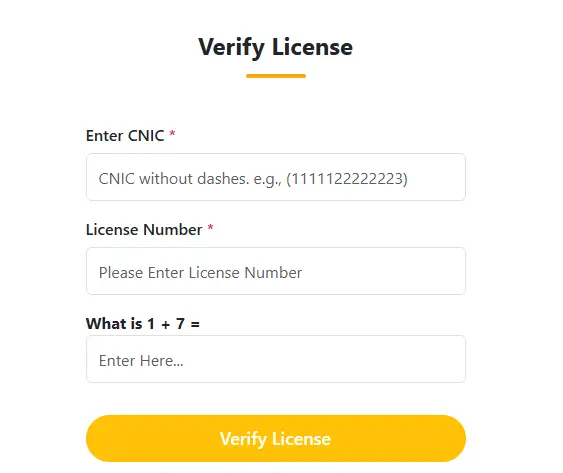
- CNIC (Computerized National Identity Card) Number: You must enter your CNIC number without any dashes or hyphens. For example, if your CNIC is 11111-2222222-3, you will enter 1111122222223. This format is standard for database queries.
- License Number: This is the unique number printed on your physical driving license card. Enter this number accurately in the designated field.
Step 3: Complete the Security Check (Captcha)
To confirm that a human is performing the verify license action and not an automated bot, the portal includes a simple security check, often an easy arithmetic question (e.g., “What is 1 + 6 = ?”).
- Calculate the answer (in this case, 7).
- Enter the result into the provided box.
Step 4: Click ‘Verify License’
Once you have entered all three pieces of information—CNIC, License Number, and the correct Captcha answer—click the “Verify License” button.
What Happens After You Click Verify License?
The system will instantly query the centralized DLIMS database and display one of two outcomes:
Outcome A: License is Valid and Verified
If the details match an active record, the system will display the license holder’s information. This typically includes:
- Full Name of the License Holder
- Father’s Name
- License Issue Date
- License Expiry Date
- License Type (e.g., Car, Motorbike, LTV, HTV)
- Current Status (Active/Valid)
What to do next: You can now confidently use the license. If you are an employer, you can proceed with the hiring process.
Outcome B: License is Invalid or Details Do Not Match
If the system cannot find a match or the license is expired, it will display an error message such as:
- “License Record Not Found.”
- “License Expired on [Date].”
- “Data Mismatch.”
What to do next:
- If the License is Expired: You must immediately initiate the renewal process through the DLIMS portal or a designated licensing center. Driving with an expired license is illegal.
- If the Record is Not Found: Double-check your CNIC and License Number again. If the details are correct, contact the relevant Traffic Police helpline immediately, as there might be a data entry error in the system.
Troubleshooting Common Verify License Issues
If you encounter problems during the verification process, try these solutions:
| Issue | Potential Cause | Solution |
| “Data Record Not Found” | Typos in CNIC or License Number. | Verify License by re-entering both numbers carefully. Remember: NO dashes in CNIC. |
| Page Not Loading | Temporary server downtime or poor internet connection. | Wait a few minutes and refresh the page. Try again later during off-peak hours. |
| Incorrect Status | Recent renewal status not updated yet. | Allow 24-48 hours for the system to process recent updates. If the problem persists, contact the DLIMS helpline. |
Trusting the DLIMS Verify License System
The ability to instantly verify license status through the DLIMS platform is a evidence to the digitization of public services in Pakistan. It is a vital tool for every driver and institution, ensuring that only valid and authorized individuals are on the road. By following this simple guide, you can always confirm the authenticity of any driving license quickly and securely, contributing to safer roads for everyone.