A driving license is a legal requirement for driving and proof of your skill on the road. In Pakistan, ensuring your license is current is a critical responsibility. Thanks to the technological advancements initiated by the Government of Punjab, the old system of lengthy renewals has been replaced by the efficient and user-friendly Driver’s License Information Management System (DLIMS).
DLIMS 2.0 has transformed the renewal process, making it possible for citizens across Punjab to complete their license renewal from the comfort of their home in a couple of minutes. This article guides you through the DLIMS online renewal process for a smooth license update.
Why DLIMS is Your Best Option for Renew Regular License
For years, renewing a driving license meant taking time off work, traveling to a Driving License Issuance Center (DLIC), waiting in long queues, and navigating complex paperwork. The DLIMS portal remove these hurdles by centralizing the service online.
Advantages of Renew Regular License online:
- Time Efficiency: The entire online application process rarely takes more than 15-20 minutes, excluding the payment time.
- Accessibility: Services are available 24/7, allowing you to apply outside regular office hours.
- Tracking: You can easily monitor the status of your application from submission to dispatch using the unique tracking number.
- Digital Validity: Upon successful payment, you immediately receive a 60-day temporary permit and can generate an E-License, allowing you to continue driving legally while the physical card is being processed.
Essential Requirements and Documentation Checklist
Before starting your application, gather all necessary documents in digital format (clear scanned copies or high-resolution photographs). Meeting these prerequisites ensures your application is not rejected due to incomplete or incorrect submissions.
1. Eligibility for Renewal
Your driving license can be renewed if it has expired or is approaching its expiry date. Licenses are typically issued for a validity period of 5 years.
- Timely Renewal: It is advisable to apply for renewal within a few weeks of the expiry date to avoid potential late fees or legal complications.
- Late Renewal: DLIMS accepts applications for licenses that have expired but delays will lead to higher penalty fees.
2. Required Documents (Digital Copies)
You must have clear digital copies of the following documents ready for upload:
| Document | Purpose | Format Requirement |
| National Identity Card (CNIC) | Proof of identity and residency. | Clear images (front and back). |
| Original Driving License | The existing license that requires renewal. | Clear image showing all details and expiry date. |
| Passport-Sized Photograph | For the new license card. | Recent, clear photo with a light (preferably blue or white) background. |
| Medical Certificate | Required only for applicants who are 50 years of age or older, or those applying for commercial vehicle licenses (LTV/HTV/PSV). | Certificate from an authorized medical practitioner. |
The Step-by-Step DLIMS Online Renewal Process
The DLIMS portal (https://dlims.punjab.gov.pk/) is the designated platform for all renewal applications. If you already have a DLIMS account from a previous application (like a Learner’s Permit), you can skip the registration step.
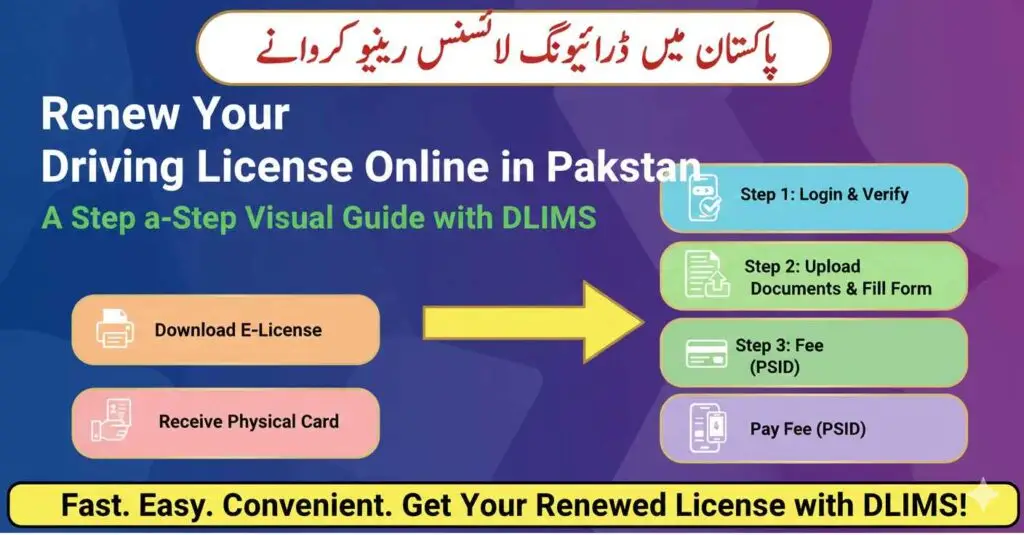
Step 1: Account Login and Verification
- Visit the Portal: Navigate to the official DLIMS Punjab website.
- Login: Enter your registered email address, password, and the Captcha code to log in to your account dashboard. If you do not have an account, you must register first, providing your CNIC, name, and email.
- Initiate Renewal: Once logged in, find the “License” or “Driving License” option in the main menu or sidebar. Select “Renewal”.
- Verification: You will be prompted to enter your CNIC Number and the number of the driving license you wish to renew. Click “Verify”. The system will fetch your existing license data.
Step 2: Filling the Online Application Form
The application form is pre-filled with existing data, but you must confirm or update certain information.
- Review Personal Data: Carefully check your name, father’s name, date of birth, and existing license category (e.g., Motor Car, Motorcycle, LTV).
- Update Contact and Address: Ensure your current mailing address (where the new card will be sent), phone number, and email are accurate. Communication regarding dispatch and tracking will rely on these details.
- Medical and Physical Status: Confirm your physical and mental fitness to drive. Upload the Medical Certificate if you fall into the 50+ age category or are applying for a heavy commercial license renewal.
- Upload Documents: Upload the required CNIC copies, your original license copy, and the fresh passport-sized photograph.
- Submit: Review all fields one last time for accuracy. Once satisfied, click the “Submit Application” button.
Step 3: Fee Generation and Payment (PSID)
Upon successful submission, your application will move to the “Pending Payment” status, and the system will generate a PSID (Payment Slip ID).
- Retrieve PSID: The unique PSID number will be displayed on your application list/dashboard. Copy this 17-digit code.
- Check Fee: The system will automatically calculate the renewal fee based on your license category and the tenure of renewal (usually 5 years), including any applicable late penalties.
- Payment: Use the PSID to pay the fee through any of the approved channels:
- Mobile Banking/E-Wallet Apps (JazzCash, EasyPaisa, or any bank app). Select “Government Payment” or “1-Link Bill Payment” and enter the PSID.
- ATM/Internet Banking (IBFT) by choosing the relevant bill payment option.
- Over-the-Counter at any commercial bank designated by the Government of Punjab.
Important Step: Successful payment instantly updates the application status on the DLIMS portal.
Read More for Apply for Learner License Click Here
License Fee Structure and Penalty Details
The fee structure for driving license renewal in Punjab varies based on the vehicle category. While the official fee schedule is subject to change, the rates generally adhere to the following structure for a 5-year renewal (excluding penalties):
| Category | Renewal Fee (1 To 5 Years) | Fine (1 To 3 Months) | Fine (3 Months To 1 Year) | Fine (1 Year) | Courier Fee | Total (Without Fine) |
| M/Cycle | Rs. 450 | Rs. 225 | Rs. 450 | Rs. 1125 | Rs. 480 | Rs. 930 |
| Tractor Commercial | Rs. 1400 | Rs. 700 | Rs. 1400 | Rs. 3500 | Rs. 480 | Rs. 1880 |
| Rickshaw | Rs. 400 | Rs. 200 | Rs. 400 | Rs. 1000 | Rs. 480 | Rs. 880 |
| Car/Jeep | Rs. 1350 | Rs. 675 | Rs. 1350 | Rs. 3375 | Rs. 480 | Rs. 1830 |
| M/Cycle + M/Car | Rs. 1350 | Rs. 675 | Rs. 1350 | Rs. 3375 | Rs. 480 | Rs. 1830 |
| Agriculture | Rs. 1350 | Rs. 675 | Rs. 1350 | Rs. 3375 | Rs. 480 | Rs. 1830 |
| LTV | Rs. 1850 | Rs. 925 | Rs. 1850 | Rs. 4625 | Rs. 480 | Rs. 2330 |
| M/Cycle + LTV | Rs. 1850 | Rs. 925 | Rs. 1850 | Rs. 4625 | Rs. 480 | Rs. 2330 |
| LTV + PSV | Rs. 1850 | Rs. 925 | Rs. 1850 | Rs. 4625 | Rs. 480 | Rs. 2330 |
| M/Cycle + LTV + Trac Com | Rs. 1850 | Rs. 925 | Rs. 1850 | Rs. 4625 | Rs. 480 | Rs. 2330 |
| HTV | Rs. 1850 | Rs. 925 | Rs. 1850 | Rs. 4625 | Rs. 480 | Rs. 2330 |
| M/Cycle + PSV | Rs. 1850 | Rs. 925 | Rs. 1850 | Rs. 4625 | Rs. 480 | Rs. 2330 |
| HTV + PSV | Rs. 1850 | Rs. 925 | Rs. 1850 | Rs. 4625 | Rs. 480 | Rs. 2330 |
| Tractor Agri | Rs. 950 | Rs. 475 | Rs. 950 | Rs. 2375 | Rs. 480 | Rs. 1430 |
| Invalid Carriage | Free | Free | Free | Free | Rs. 480 | Rs. 480 |
Note on Fees: It is highly recommended to check the exact fee generated by the DLIMS system during your application, as fees are subject to government revisions and may include a processing charge. Always rely on the PSID amount.
Consequences of Delayed Renewal (Fines/Penalties)
DLIMS charges fines for renewing a license after it expires—the longer the delay, the higher the penalty.
| Delay Period | Penalty Imposed |
| Up to 1 year after expiry | Penalty is typically equal to the original renewal fee. |
| 1 to 3 years after expiry | Penalty often doubles the original renewal fee. |
| More than 3 years after expiry | Substantial penalties apply, and in some extreme cases, re-testing might be required. |
If your license has expired, the DLIMS system will automatically calculate the total amount due (Renewal Fee + Penalty).
Post-Submission and Receiving Your New Card
Once the fee is paid, the system moves swiftly to finalize your license renewal.
1. Temporary 60-Day Permit
Immediately upon successful payment, the DLIMS portal grants you a 60-day temporary driving permit. This temporary document is valid for driving across Pakistan and ensures you remain compliant with traffic laws while you await your physical card. This permit can be printed directly from your dashboard.
2. Downloading Your E-License
For added convenience, DLIMS allows you to generate an E-License (Electronic License) which acts as a valid digital copy of your renewed license.
- On the DLIMS dashboard, look for the “E-License” or “Generate E-License” tab.
- Enter your CNIC and date of birth.
- Click “Generate” and download the PDF.
This E-License can be displayed on your smartphone and is recognized by law enforcement until your plastic card arrives.
3. Physical Card Delivery
The finalized physical driving license card is dispatched through a reliable courier service (often Pakistan Post or a private courier) to the mailing address provided in Step 2.
- Processing Time: The new card typically arrives at your doorstep within 4 to 6 weeks from the date of successful payment.
- Tracking: You can track the status of your physical card dispatch on the DLIMS portal using your application number.
Driving License Management Simplified
The DLIMS online renewal system is a cornerstone of digital governance in Punjab, offering unparalleled convenience and efficiency to millions of drivers. By digitizing the paperwork, streamlining payments, and providing instant temporary permits, DLIMS has fundamentally simplified the process of maintaining a valid driving license.
By following this detailed guide, you can ensure your license renewal is seamless, timely, and compliant with all provincial regulations, keeping you legally and safely on the road.
DLIMS Contact and Support Information
| Service | Contact Detail |
| Toll-Free Helpline | 15 |
| General DLIMS Queries | 042-99332181 |
| DLIMS Appointments/Information | 042-99030130 |
| Email Support | info@dlims.punjab.gov.pk |